In development

The Neurodivergent Dads app

A task app that assumes you’ll forget it exists, get overwhelmed halfway through, and need someone else to help carry it. Because that’s the real world.

Start here

The two things it asks of you

Get it out of your head. Pick three. Everything else in the app exists to support those two moves.

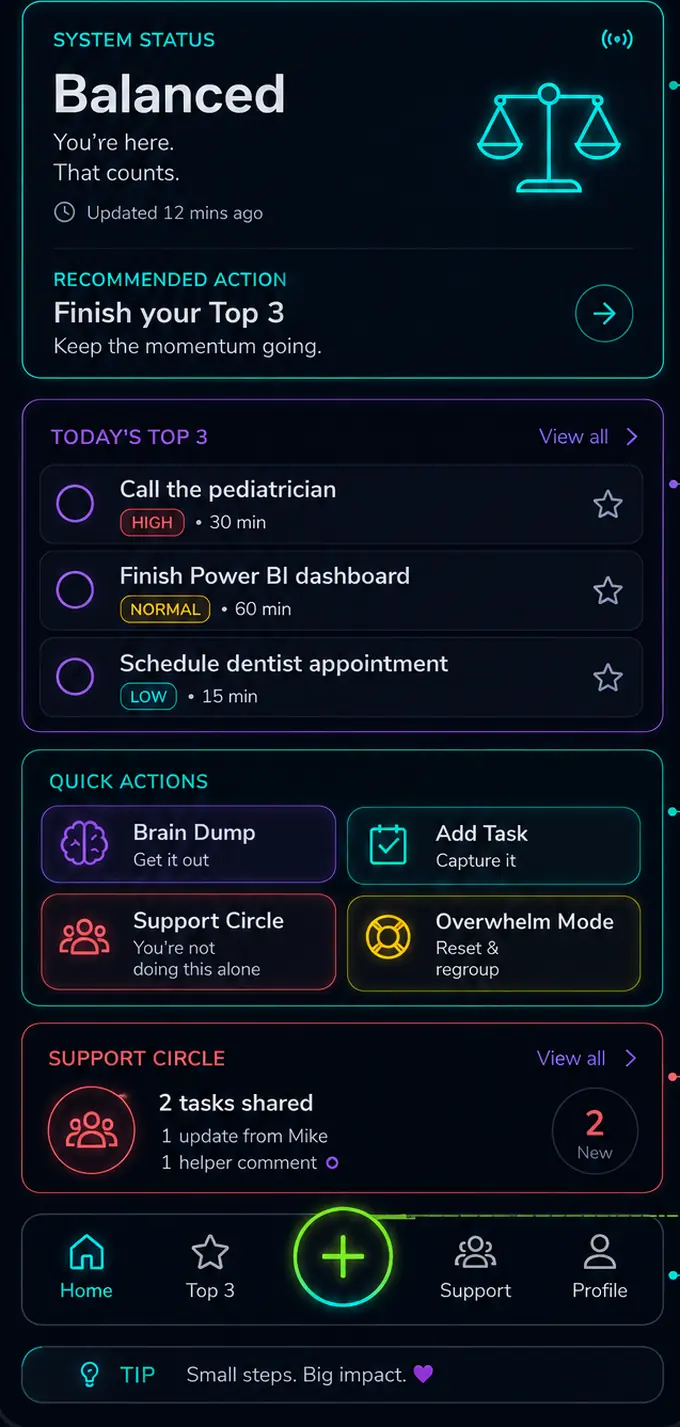
App home screen showing system status, today's Top 3 tasks, quick actions and support circle updates.
HomeWhere your head is at, what your three things are, and who’s got your back — all above the fold.
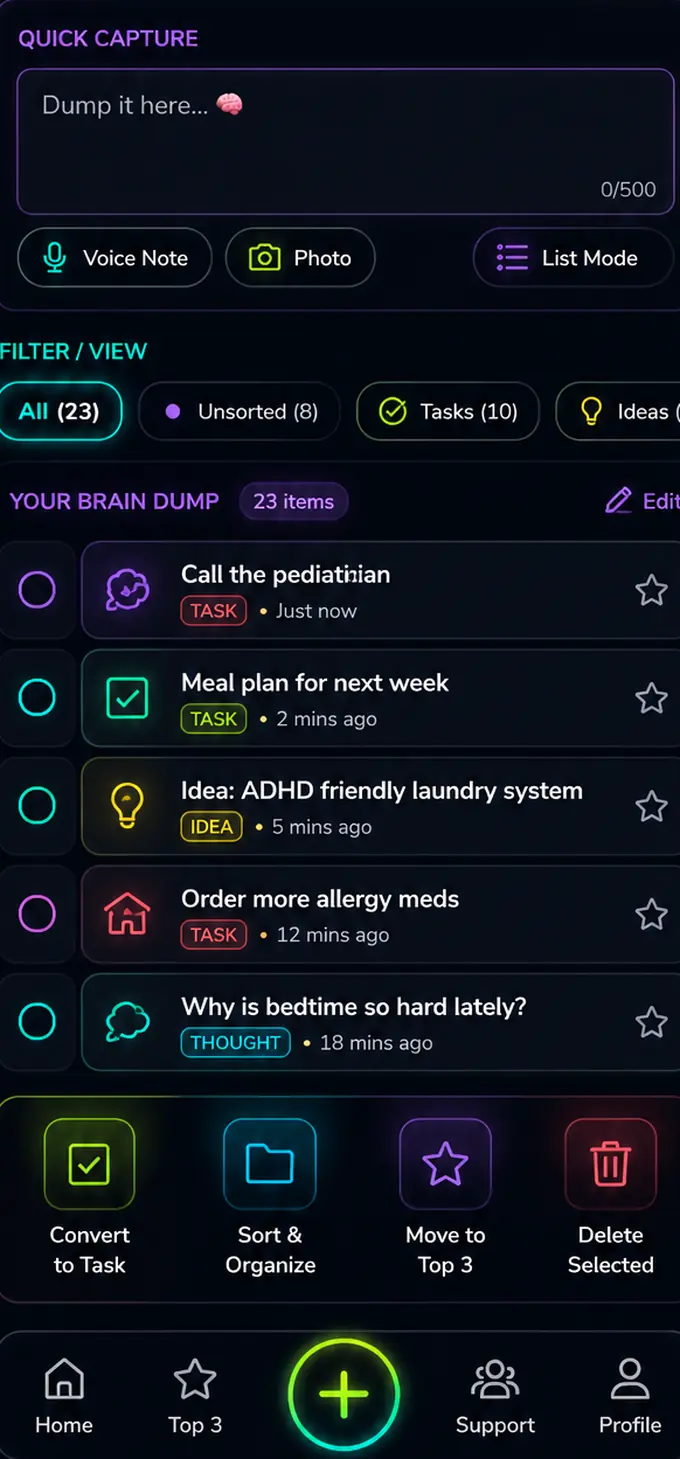
Brain Dump screen with a quick capture box, filters for unsorted items, tasks and ideas, and a list of captured thoughts.
Brain DumpType it, say it, photograph it. No categories, no structure, no wrong answers. Sort it when you have capacity.
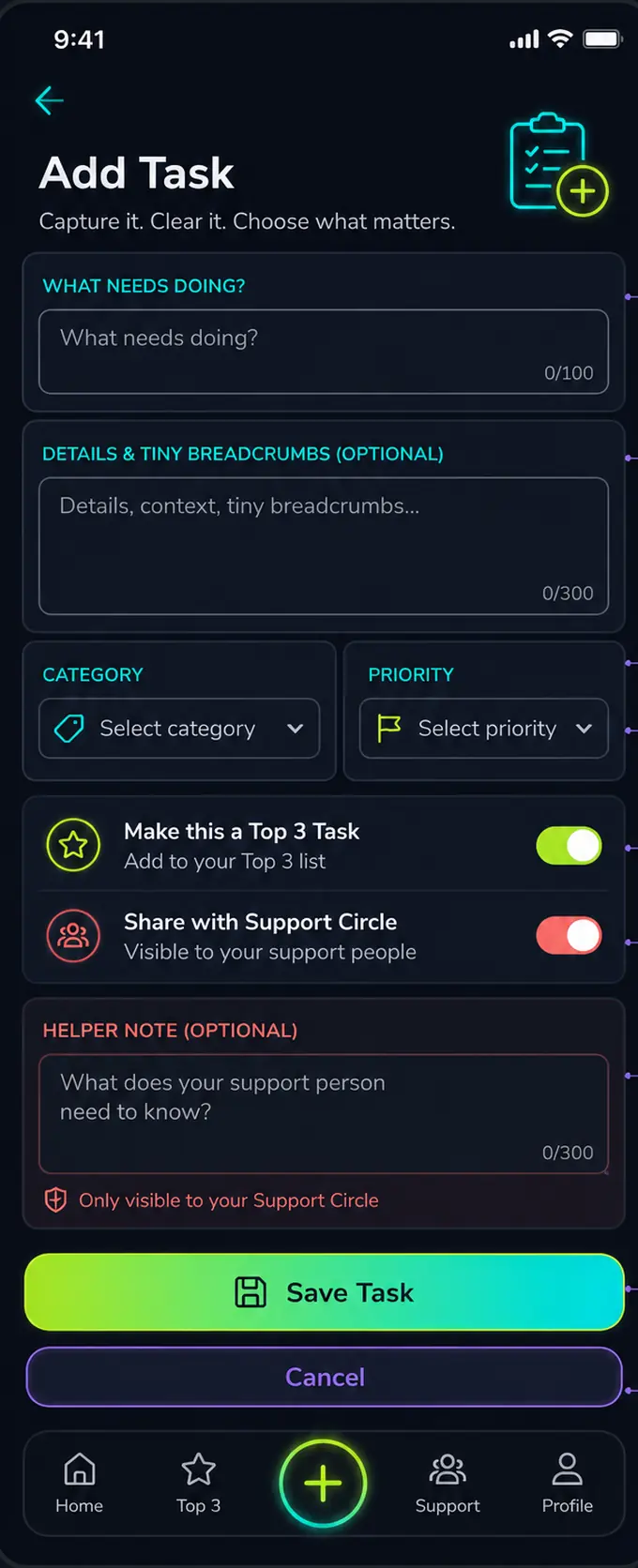
Add Task screen with fields for title, details, category and priority, plus toggles for Top 3 and sharing with your support circle.
Add TaskTwo fields to capture it. Everything else is optional — including asking someone to help you carry it.
The tour

Eight screens, and why each one
is built the way it is

Every screen had to answer the same question before it got built: would this still work on a bad day?

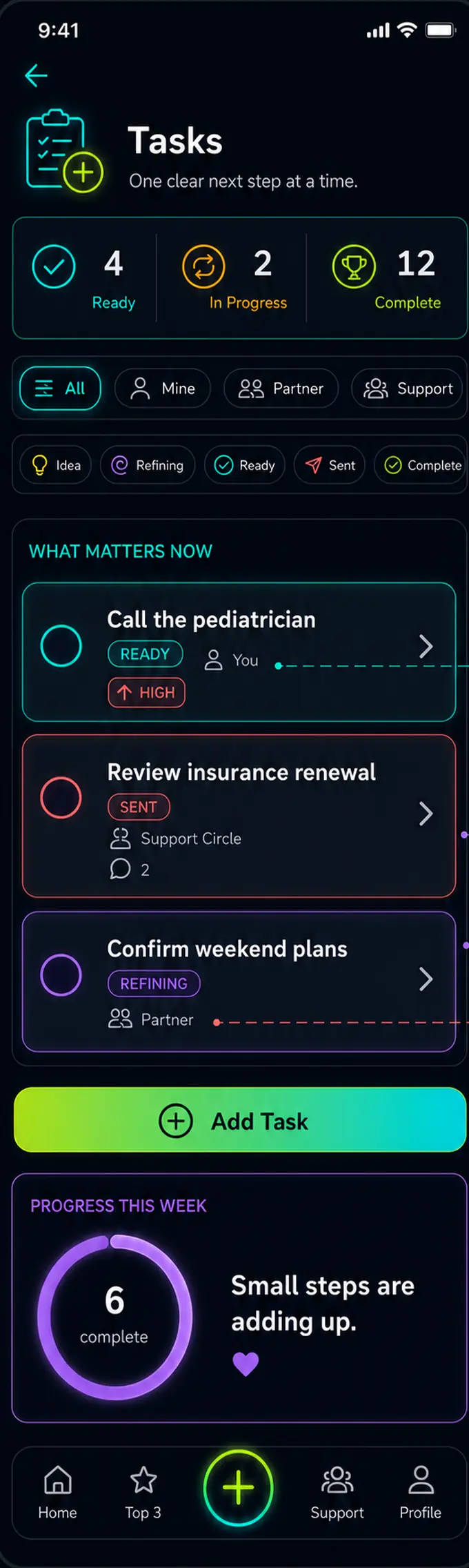
Tasks screen: a snapshot of ready, in-progress and complete counts, filters by person and workflow stage, and three task cards showing assignment and priority.

Tasks

One clear next step at a time.

Everything you’re carrying, filtered by who’s carrying it and how far along it is — Idea, Refining, Ready, Sent, Complete. A weekly progress ring at the bottom, with no target attached to it.

Why this works

A list of forty open items isn’t a plan, it’s a threat — and an ADHD brain will avoid the whole list rather than pick from it. Giving half-formed thoughts a legitimate place to sit means they stop nagging without being forced into a decision you can’t make yet. And naming who owns each task makes invisible household load visible, which is where most of the resentment lives.
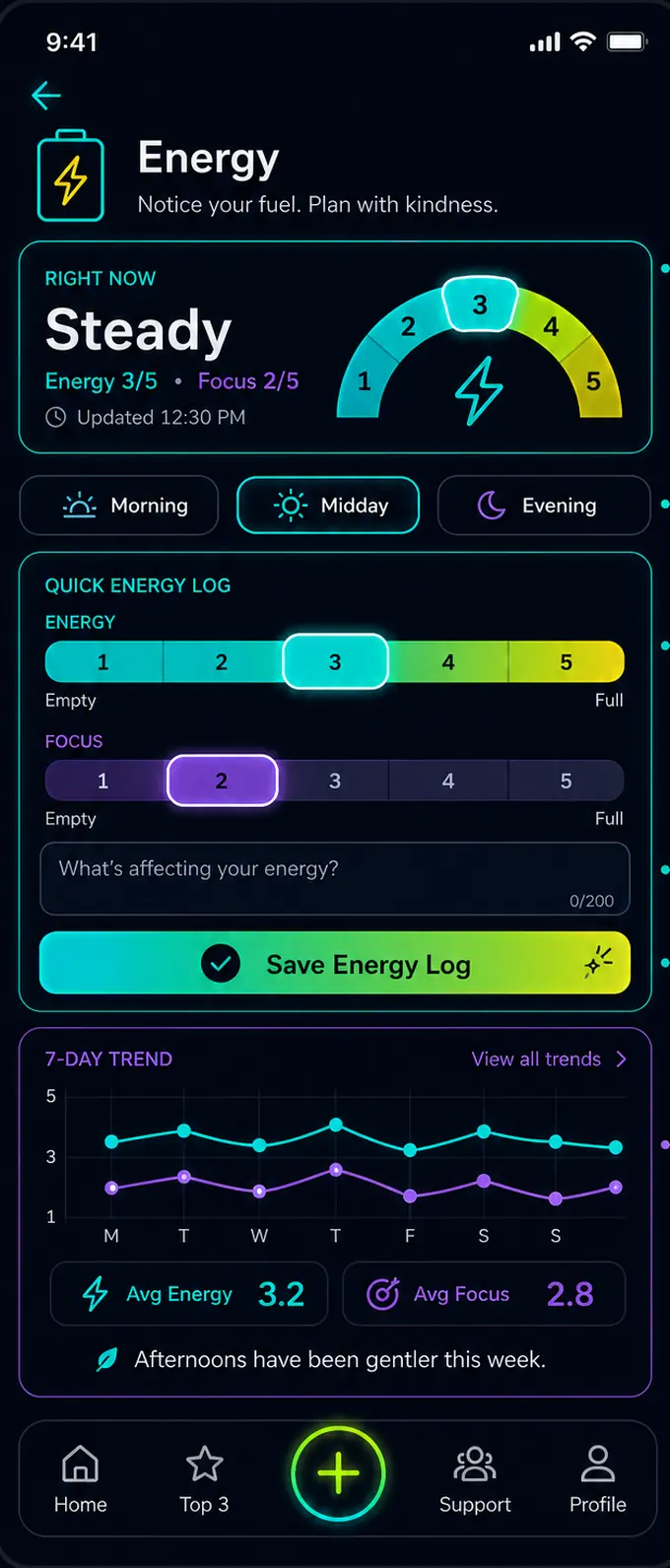
Energy screen: a current-energy dial reading Steady, morning/midday/evening tabs, 1-to-5 sliders for energy and focus, a notes field, and a seven-day trend chart.

Energy

Notice your fuel. Plan with kindness.

Rate energy and focus from 1 to 5 — morning, midday or evening. Add a note if you know what’s driving it. After a week, a trend line appears on its own.

Why this works

Most planning tools assume time is the constraint. For neurodivergent people it almost never is — it’s capacity, and capacity is invisible until it’s already gone. Many of us also have unreliable interoception, so we genuinely don’t notice we’re running low until we’re past it. Two taps twice a day builds an external record of something your body isn’t telling you reliably.

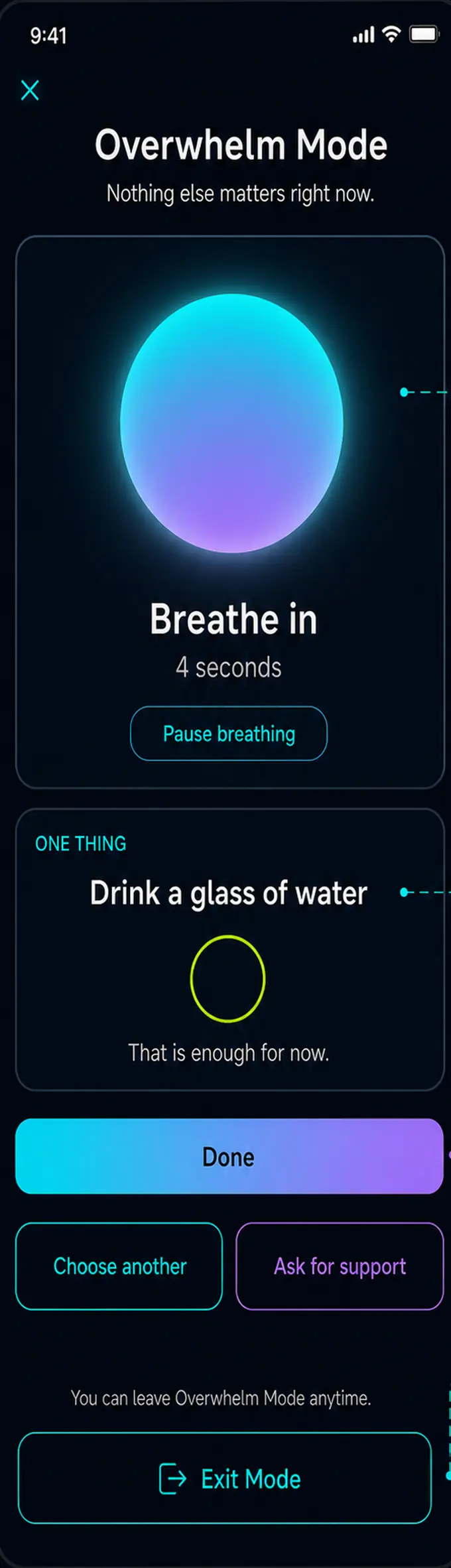
Overwhelm Mode screen: a large breathing orb with a four-second inhale prompt, a single suggested action, and a prominent exit button.

Overwhelm Mode

Nothing else matters right now.

One button collapses the app to a breathing rhythm and a single small action. Done, choose another, ask for support, or leave.

Why this works

At peak dysregulation, choice itself is what’s broken — every extra option is another decision you can’t make. This screen exists for the moment the app has become too much, so it removes almost everything, refuses to set a target, and puts “Exit Mode” in plain sight. That last part matters more than it looks: when leaving is easy, demand avoidance doesn’t kick in.

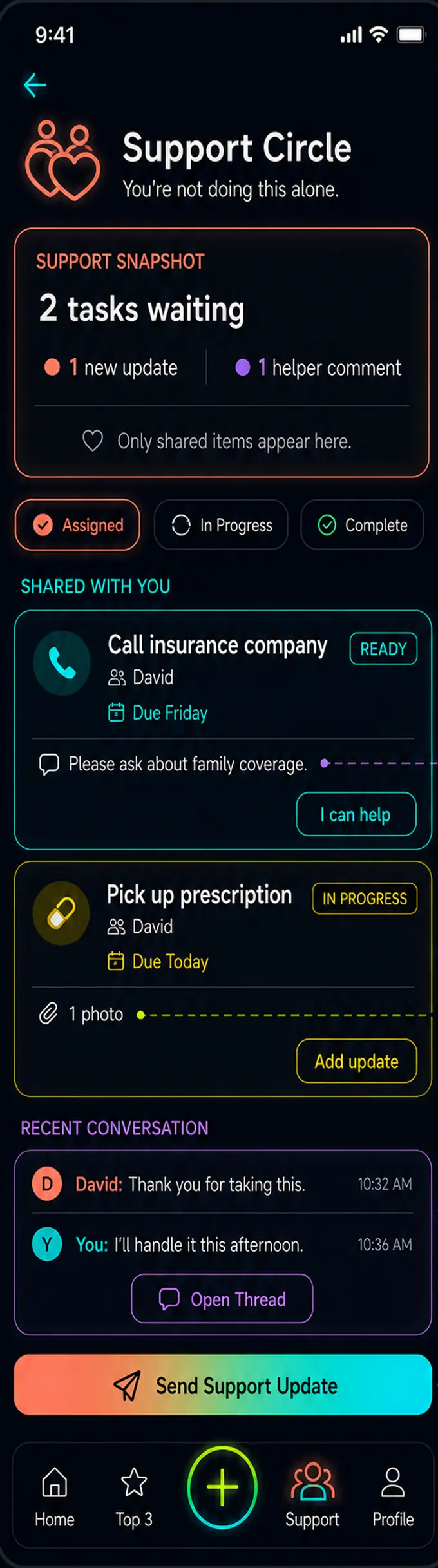
Support Circle screen: two tasks shared with a helper, each with a note, a due date, an attachment, and a recent conversation thread.

Support Circle

You’re not doing this alone.

Share a task with someone who’s offered to help, along with a note about what would actually be useful. They see that task and its context — nothing else.

Why this works

Asking for help takes exactly the executive function you don’t have on the day you need help. This turns the ask into a toggle. The helper gets enough context to step in without needing your whole backstory, and the line at the bottom of the screen is the entire design philosophy: helping does not mean taking over. Support that removes your agency isn’t support.

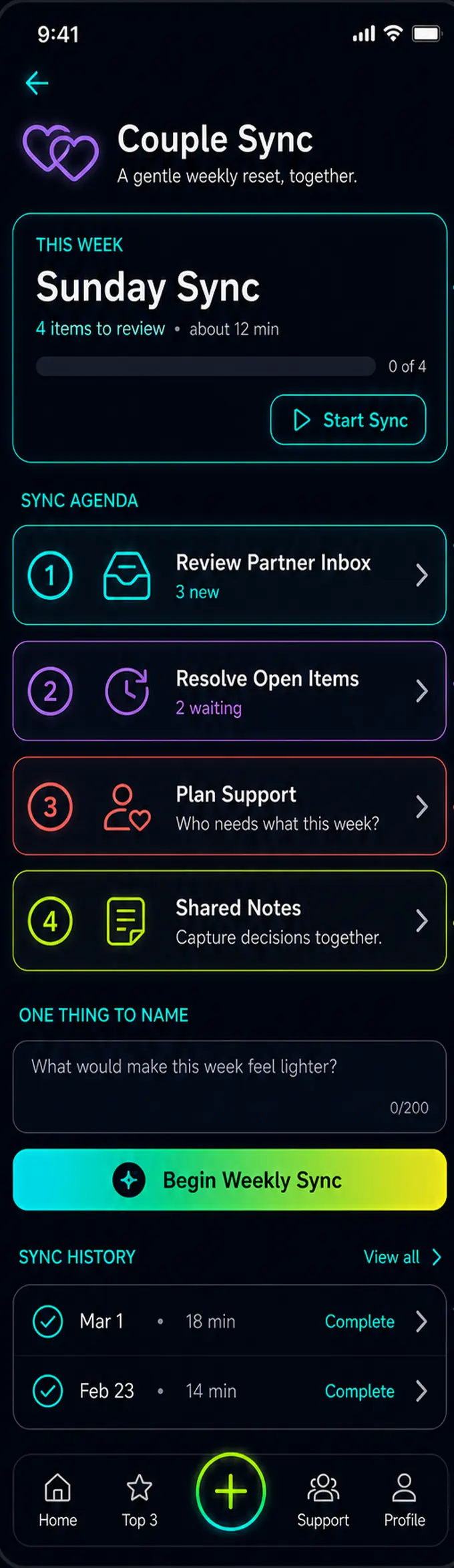
Couple Sync screen: a weekly sync card showing four items and a twelve-minute estimate, a numbered agenda, a reflection prompt, and past sync history.

Couple Sync

A gentle weekly reset, together.

A guided twelve-minute agenda once a week — partner inbox, unresolved decisions, who needs what, shared notes. Past syncs are kept so you can look back without holding it all in your head.

Why this works

Neurodivergent relationships rarely come apart over love. They come apart over unspoken load and decisions that never quite get made. A standing agenda means nobody has to remember to raise something at the worst possible moment — usually 11pm, usually mid-argument. Structure isn’t unromantic. It’s what lets the conversation happen before the pressure builds.

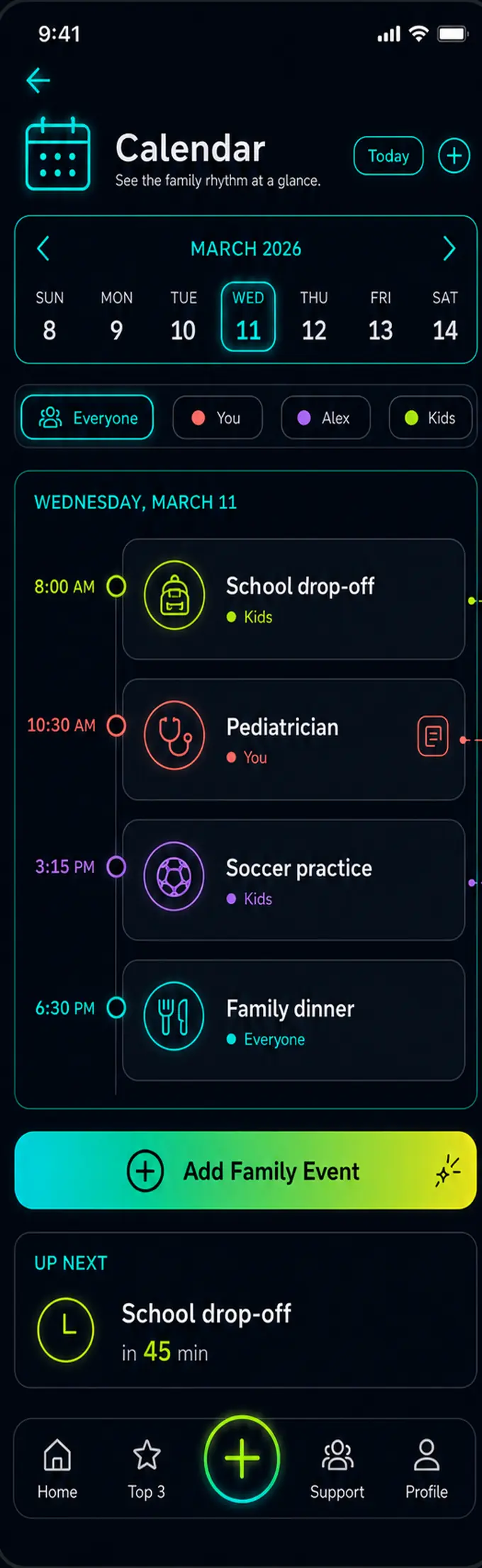
Calendar screen: a single-week strip for March, per-person filters, a colour-coded daily timeline, and an up-next card counting down 45 minutes.

Calendar

See the family rhythm at a glance.

A week at a time, colour-coded per person, with a plain “up next in 45 min” card that answers the only question you were actually asking.

Why this works

Time blindness is one of the least understood parts of ADHD — it isn’t forgetting the appointment, it’s not feeling how far away it is. A month grid makes that worse by burying today in a wall of boxes. A week view with one clear next thing answers what’s happening and when you need to move, which is all the information you can act on anyway.

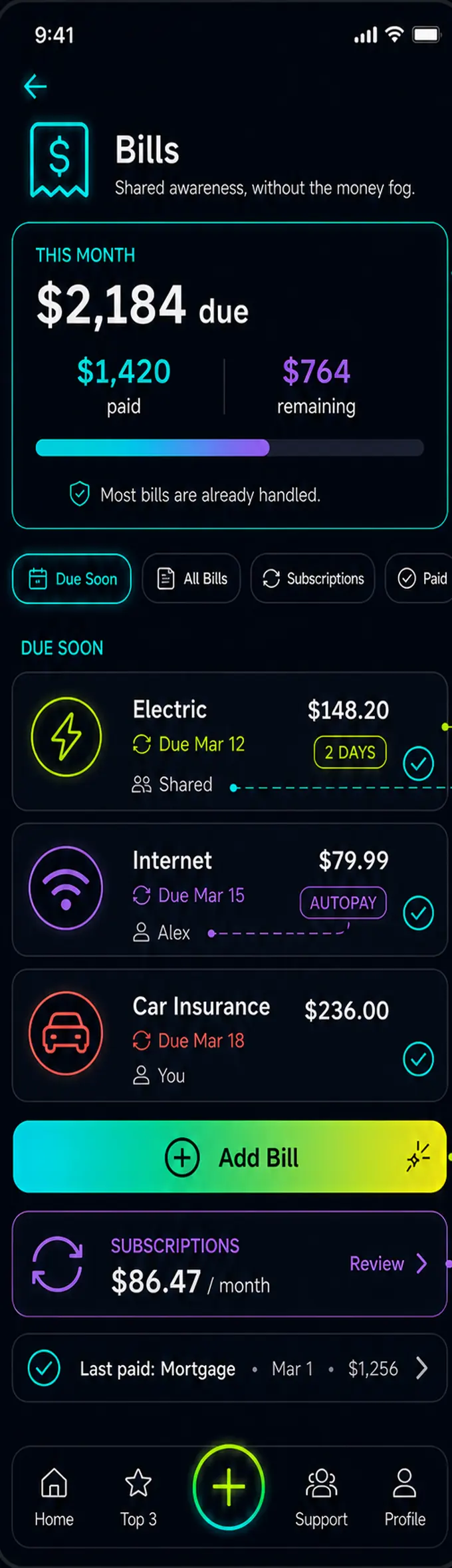
Bills screen: a monthly total showing amount paid and remaining, filters for due soon and subscriptions, three upcoming bills with owners, and a monthly subscription total.

Bills

Shared awareness, without the money fog.

What’s due, what’s already paid, who’s handling each one, and what subscriptions are quietly running in the background.

Why this works

Money admin is where executive dysfunction is most punishing and most hidden — the unopened envelope, the autopay you forgot, the late fee that felt like proof you were failing. So this screen leads with what’s already handled rather than what you’ve missed. Shared ownership makes the person doing the invisible work visible, and means nobody has to ask twice.

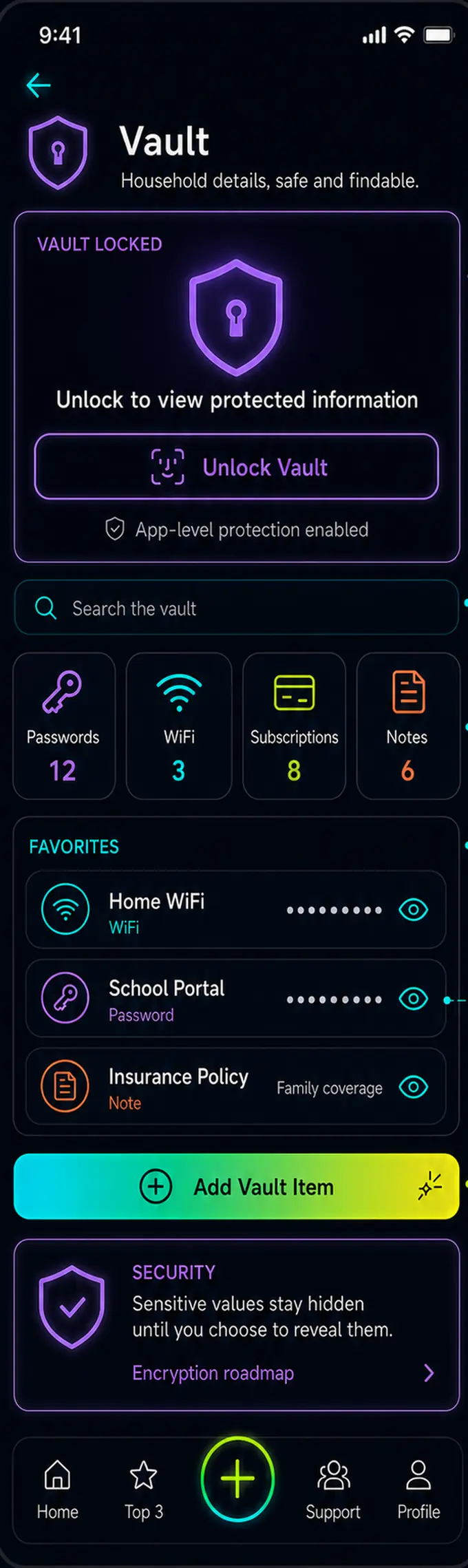
Vault screen: a locked state requiring unlock, a search field, category tiles for passwords, WiFi, subscriptions and notes, and favourite items with masked values.

Vault

Household details, safe and findable.

Passwords, WiFi, subscriptions and notes in one searchable place — behind app protection, with sensitive values masked until you choose to reveal them.

Why this works

“Where’s the WiFi password, the policy number, the school login” is a small tax paid several times a week, in exactly the resource that’s scarce. Working memory is not a filing system and was never going to be. Putting it somewhere findable removes a whole category of daily friction — and masking by default means you can hand someone your phone without a second thought.

Also in the app

Two more that quietly do a lot

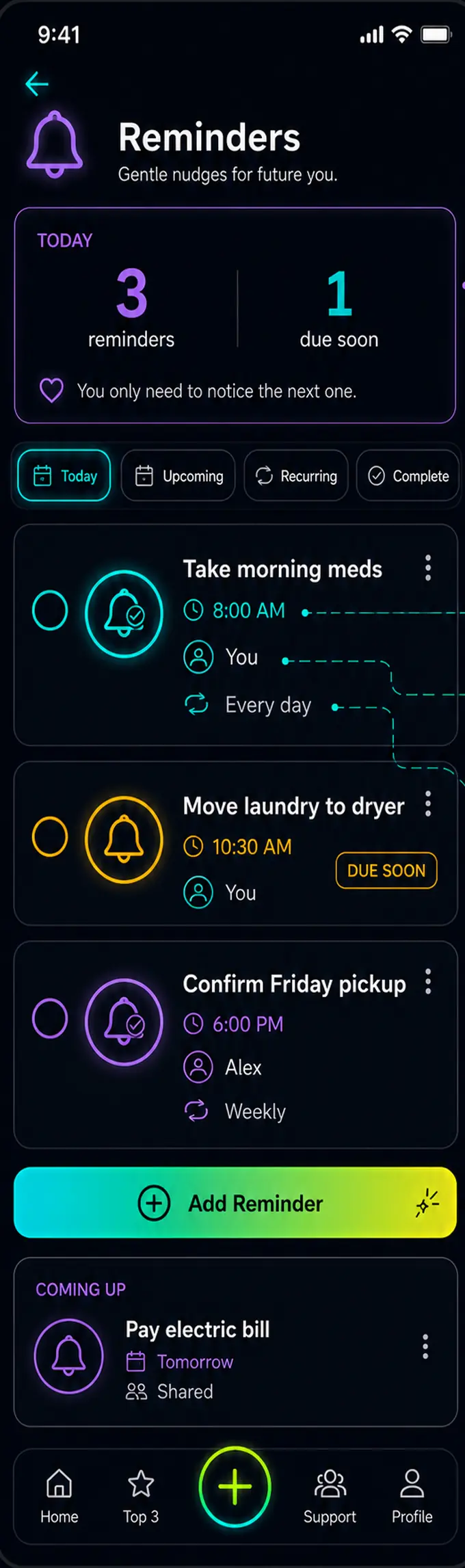
Reminders screen: today's count, filters for today, upcoming, recurring and complete, and three reminders with times, owners and recurrence.
Reminders — gentle nudges for future youProspective memory — remembering to remember — is the weakest link for most ADHD brains. Set the recurrence once and stop holding it. The screen’s own tip says it best: a reminder is support, not a test.
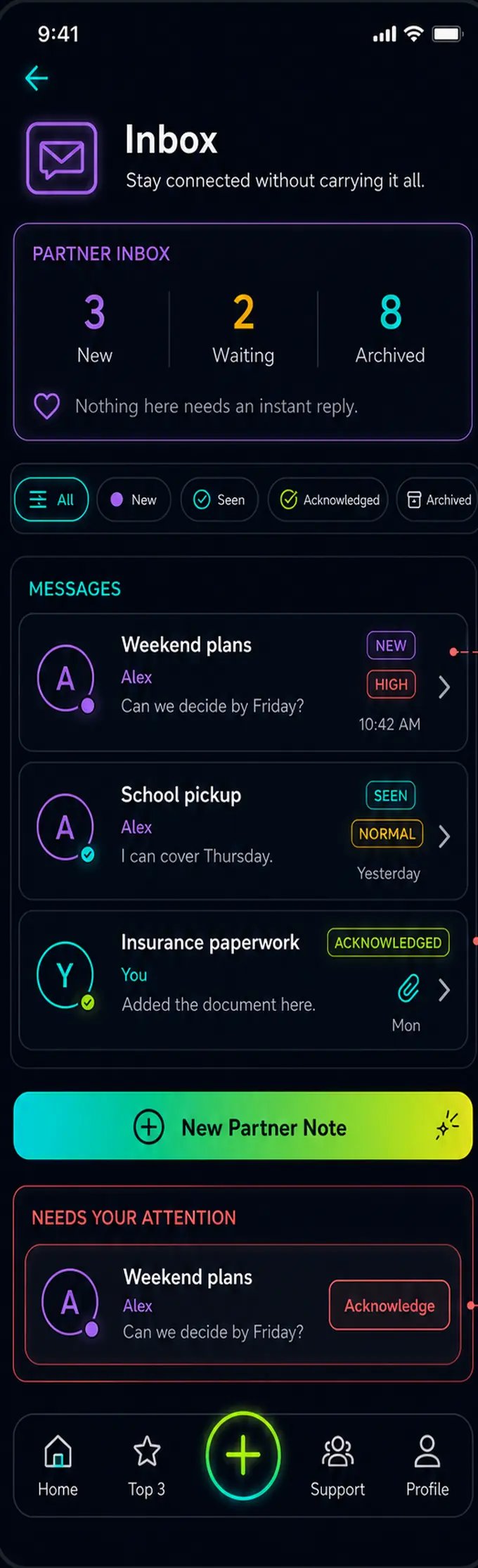
Inbox screen: partner inbox counts for new, waiting and archived, status filters, three messages with priority labels, and an item needing acknowledgement.
Inbox — stay connected without carrying it allMessages from your partner get buried in the same feed as everything else, and the pressure to solve something immediately is what turns it into avoidance. Here, acknowledging is a complete action. They know you saw it. You haven’t signed up to fix it this second.
Design principles

The rules we build against

🧠

Capture before you organise

Most apps make you file a thought before you’ve finished having it. Brain Dump takes it raw, then helps you sort it later — or never.

Three things, not thirty

A visible list of 47 tasks isn’t a plan, it’s a threat. Top 3 is the only list the home screen will ever show you.

👥

Asking for help, without the ask

Flip one toggle and a task becomes visible to your support circle, with a note about what would actually help. No difficult conversation required.

Energy, not just time

The Energy Log tracks what your day actually costs you. Over a few weeks the patterns get impossible to ignore — in a useful way.

🗻

An exit from every screen

Nothing traps you mid-flow, nothing guilt-trips you for leaving, and no streak breaks because you had a hard week. Demand avoidance is real.

🔒

Your data stays yours

No ads, no selling behavioural data, no engagement tricks. A brain dump is one of the most private things you can write down.

Early access

Want to try it before everyone else?

We’re opening a small test group first — people who’ll tell us honestly what’s broken. Add your email and we’ll be in touch when there’s something worth putting on your phone.